

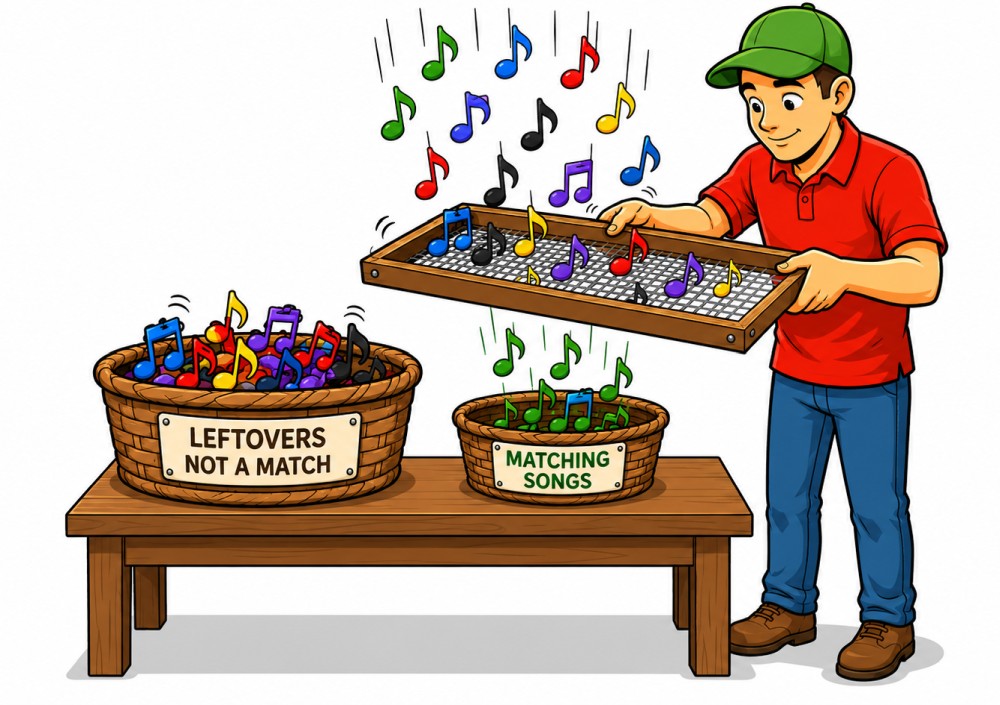
Sometimes a normal genre filter isn't enough.
Sure, you can in Callers Caddy Planner by Pattern, Singing, Genre or filter via search. That helps a lot in many situations.
But what if you need a very specific selection?
For example:
You're planning a special night out at the club.
You prepared a playlist with suitable songs beforehand.
Or you're calling together with another caller and you only want to use songs that you both know how to sing.
That's exactly what the new one is for. Custom Filter in the planner.
What does the custom filter do?
With the Custom Filter You can use previously saved playlists as additional filters in Planner.
That means:
You load one or more playlist files into the custom filter dialog. Afterwards, an additional filter row with checkboxes appears in the Planner. If you activate a filter there, the left-hand song list in the Planner will only show you the songs that match the loaded playlist.
It gets even more exciting when you activate multiple custom filters at the same time.
Then the planner will only show you songs that are in all active playlists occur together.
This is especially useful if you want to find common ground.
Example: Two callers plan an evening together
Imagine you're on a call with Bill.
You have your own list of songs that you like to use.
Bill also has a playlist with songs, whom he knows well.
Now you want to plan an evening together and are looking for songs that you can both definitely call out.
In the past, this would have been done by hand:
Open playlist.
Compare song titles.
Searching back and forth.
Perhaps something was overlooked.
Now it's easier.
You open the Custom Filter, You load your playlist into one slot and Bill's playlist into a second slot. Then you give the second filter a name, for example. Bill.
Once both filters are active, the planner will only show you the songs that appear in both playlists.
So you can see immediately:
Which songs can we both use together?
Example: Preparing for a special club night
The custom filter is also helpful if you are planning special themed evenings.
Perhaps you want to prepare an evening with songs that are particularly well-suited to your club. Or you have a selection for a slower club night, a student night, a special dance event, or an evening with a more relaxed energy.
Not every selection can be neatly categorized by genre.
An Irish evening might still work through the genre. Irish.
But what about:
Your club's favorite songs
Songs for new dancers
especially safe singings
Songs for a specific caller
Songs for a specific mood
Songs you have prepared for a special
Such choices are often more personal than a genre.
You can now simply save a playlist and use it later as a custom filter in Planner.
This is how it works in Planner
In Planner, you'll now find a new button in the filter bar:
Custom
He sits near the other filters, so close to... All, Pattern, Singing and Genre.

If you are on Custom When you click, the new custom filter dialog opens.
There you have up to four fixed slots. You can load a saved playlist into each slot.
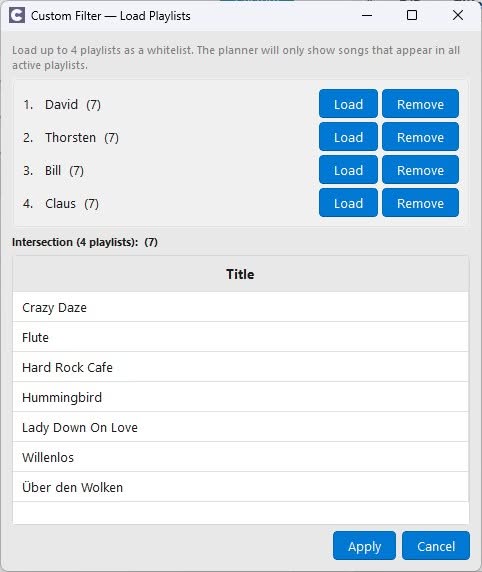
Each slot has two important buttons:
Load loads a saved playlist.
Remove deletes the playlist from this filter slot.
The dialog supports saved playlist TXT files in both current and older formats.
Name change: "Playlist 1" becomes "Bill"„
To make the filters in Planner easier to understand later, you can give each slot its own display name.
For example:
Bill
Student Night
Club Favorites
Safe singing
To do this, simply double-click on the slot name and change the display name.
Important: This does not change the playlist file itself. You are only changing the name under which the filter is displayed in Planner for this session.
Preview: Instantly see what's left
The Custom Filter dialog includes a preview table.
This preview shows you directly which songs will remain after applying the loaded filters.
If you load multiple playlists, Callers Caddy automatically calculates the intersection.
That means:
When a playlist is loaded, you will see the songs from that selection.
With two loaded playlists, you will only see songs that appear in both.
With three or four playlists loaded, the selection becomes correspondingly narrower.
This way you can immediately see whether your filters are useful or whether the overlap is perhaps too small.
After applying the filter, a new filter row appears.
When you apply the custom filter, an additional filter row appears in the Planner.
This series is only visible if at least one playlist has been loaded.
Each loaded playlist has its own checkbox. You can quickly turn the custom filters on and off using these checkboxes.
The beauty of it is:
The song pool in Planner responds immediately.
If you activate a filter, the left-hand song list will be restricted immediately.
If you deactivate it again, the list will be expanded again.
This way, you can quickly try out which selection best suits your evening when planning.
The normal filters will remain active.
The Custom Filter does not replace the existing Planner filters.
He complements them.
You can also filter by:
Search
Sorting
All / Pattern / Singing
Genre
This means, for example:
You can first use the Custom Filter to display only Bill's songs.
Then you can also access Singing filtering.
And then maybe look for a genre.
This way, a large song library becomes a very targeted selection.
The filter only applies to the current session.
The custom filter is intentional session-only.
That means:
The loaded filters remain active only during the current work session. If you Caller's Caddy finishes, They are not stored permanently.
This has one simple advantage:
You can flexibly prepare the Planner for a specific planning situation without permanently changing your normal work environment.
For an evening out with Bill, you download Bill's list.
For a Student Night, you load your Student Night selection.
For a themed evening, you download the appropriate special playlist.
And the next time you start the planner, it will be clean again.
Why this feature is helpful
The custom filter makes the planner more personal.
Because not every sensible song selection is neatly embedded in the song data. Some things come from experience:
If you activate a filter, the left-hand song list will be restricted immediately.
If you deactivate it again, the list will be expanded again.
Which singings are safe for this caller?
Which songs are suitable for this group??
Which titles do I consciously want to avoid today?
What selection have I prepared for this special evening?
You can record these decisions using saved playlists. And with the custom filter, you can use these decisions directly in Planner.
This saves search time.
It reduces mistakes.
And it helps you to put together a suitable setlist for the evening more quickly.
Conclusion: More control over your song library
The new Custom Filter in Planner This is especially useful if you don't just want to plan by genre or song type.
You can use saved playlists as filters, give them understandable names, and selectively turn them on or off in the Planner.
This way you can find the songs that really fit your current plans more quickly.
Whether it's shared caller evenings, special nights, club favorites or personal work lists:
The Custom Filter makes the Planner more flexible – and your song selection is significantly more precise.
It might be useful if that filter could also be used the other way around—to keep only the tunes that are in the left playlist but not in the right one.
So when I'm calling with Bill, I'll choose the singers so we can sing them together, but I'll choose the patterns so that I play something different from what Bill is playing.