


An empty playlist wastes time.
You probably already know how many tips you need. You also know whether you want to use patterns, singings, or both. Nevertheless, you still have to select each song individually and put them in the correct order.
That's exactly what this is for now Auto-Fill in the planner.
With one click, Callers Caddy automatically fills your playlist, according to the structure you define.
The new magic wand in the planner
There's now a new feature in Planner. Magic wand button.
You'll find it in the middle bar, in the third position. Clicking it opens the autofill dialog.
There you can set:
- How many tips you want to plan
- Which structure the playlist should have
After that, the Caller's Caddy automatically fills the playlist.
You will immediately receive an initial proposal for your club evening. You can review, change, or add to this proposal.
Four structures for typical club nights
Auto-fill can build your playlist in four ways.
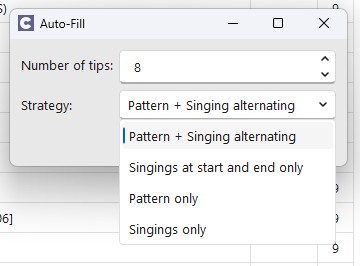
1. Pattern + Singing alternating
This setting plans one pattern and one singing for each tip.
The playlist might look something like this:
Pattern
Singing
Pattern
Singing
Pattern
Singing
This is the classic form if you plan each tip as a pair of pattern and singing call.
2. Singings only at the beginning and end
This structure begins and ends with a pattern singing pair.
Only pattern songs are inserted in between..
This works well if you want to have singing sessions in the evening, but plan the main part more as a pattern-focused evening. For example, for practice evenings, workshops, or club nights with a focus on figures.
3. Patterns only
This setting fills the playlist exclusively with pattern songs.
This is practical for training, teaching, workshops, or targeted repetitions.
4. Only Singings
This setting fills the playlist exclusively with singing songs.
This is helpful if you need a singing list quickly. For example, for a singing call block, a special or a prepared selection for specific moments.
The choice of genre is also taken into account.
The auto-fill feature doesn't just use the selected structure. It also takes your current genre selection into account.
This allows you to plan more effectively.

For example:
„"I need an Irish evening."“
„"I would like to play songs from the 50s today."“
„"I want a playlist with a country feel."“
Of course, this only works if your songs are properly maintained. Callers Caddy can only work with the data that is already in your collection.
If your songs have relevant genre information, Auto-Fill can create a thematically appropriate playlist from them.
The overall duration remains realistic.
The planner also takes into account the total duration of the playlist.
Pattern songs give There is a special feature: Some patterns are based on Loop = ∞. So, theoretically, they run indefinitely.
That would be useless for scheduling. Therefore, the caller's caddy in this case the preset pattern duration from the respective program or club.
This ensures that the calculated total duration remains meaningful.
Not a complete evening, but a good start.
Auto-fill doesn't make the decision for you.
But it eliminates the need for a blank start.
Instead of dragging each song individually into the playlist, you define the number of suggestions and the desired structure. If you've selected a genre, that will also be taken into account.
The caller's caddy creates a first complete playlist from this.
Then you can check:
Does the order make sense?
Do I want to replace individual songs?
Is a particular title missing?
Should a song be released sooner or later?
You're not starting from scratch, but with a usable proposal.
Outlook: Evening planning will get even better
Auto-fill is a first step.
This feature already helps you get from an empty playlist to a playable plan more quickly.
Evening planning will soon be available at Callers Caddy further expanded. Then it's not just about filling a playlist, but about planning the club night even more strategically. Including controlling the emotional trajectory.
For the moment, Auto-Fill does exactly what often helps most in everyday life:
You click on the magic wand.
You choose the number of tips.
You choose the structure.
The caller's caddy draws up the first plan.