


Previously, some settings in Callers Caddy required direct editing of the file. callers_caddy.ini go.
That was possible. But it wasn't particularly pleasant.
You had to find the right file. Then you had to find the right spot. After that, you had to change the value correctly. And if you made a typo, things could quickly become confusing.
With the new General Settings That will make it much easier.
Change settings directly in Callers Caddy now
The most important general settings can now be adjusted directly via the interface.
You can find them in the menu under:
Settings / General Settings
There you can change settings without having to open the INI file manually. This makes Callers Caddy much more user-friendly.
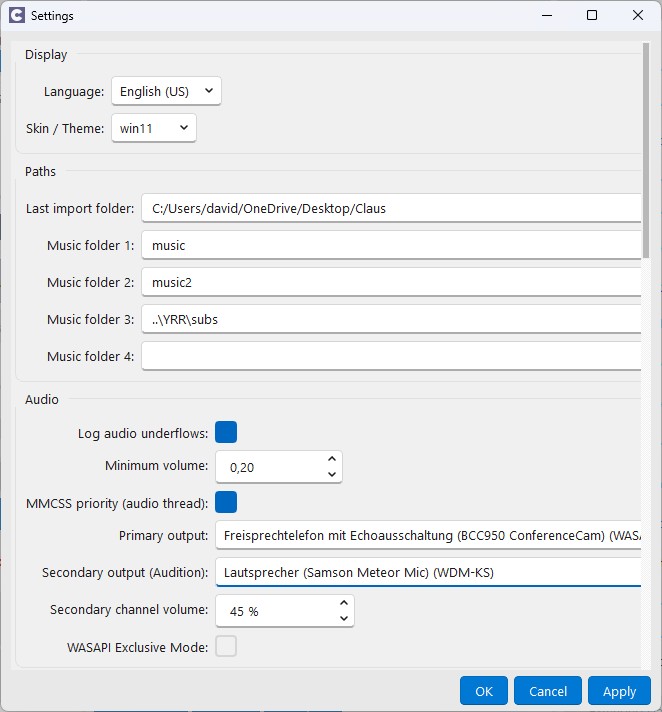
Especially for users who don't like working with configuration files, this is a big step forward.
The INI file remains the basis
Technically, everything remains clean and transparent.
The settings will continue to be taken from the file callers_caddy.ini They have been read. And they will continue to be stored there.
The only difference is:
You normally don't need to edit this file yourself.
Caller's Caddy takes care of that for you via the interface.
This combines both advantages:
The settings are saved in a simple configuration file. At the same time, you can change them much more conveniently.
Why this is important
Caller's Caddy has become increasingly comprehensive in recent versions.
There are more features. More options. More personal customizations.
That's good. But it also means: settings need to be more easily accessible.
Not every caller wants to work with an INI file. And not everyone should need to know how a configuration file is structured.
The new General Settings therefore make Caller's Caddy more accessible.
You can better adapt the program to your way of working, without technical hurdles.
No in-depth look at each individual setting
In this article, we will deliberately not go through every single setting.
The area is now too large for that.
Many settings affect very different areas of Callers Caddy. Some are important for the appearance. Others for the behavior of certain functions. Still others relate to more technical details.
This article is primarily intended to show you:
The settings are now easier to access.
You no longer need to go directly into the INI file just to change a general setting.
A small step with a big impact
The general settings may seem unspectacular at first glance.
But in everyday life, they save time.
You don't need to search. You don't need to open a file. You don't need to pay attention to whether you're editing the right line.
You simply open Caller's Caddy, go to Settings / General Settings and adjusts the desired setting there.
That's easier. Safer. And much more pleasant.
Conclusion
The General Settings make Caller's Caddy more user-friendly.
Previously, settings sometimes had to be configured directly in the browser. callers_caddy.ini They can be changed. Today, this can be done conveniently via the interface.
The INI file will still be present in the background. But you no longer need to edit it yourself.
For you as a caller, this means:
Less technology. Less searching. More convenience when setting up Callers Caddy.