

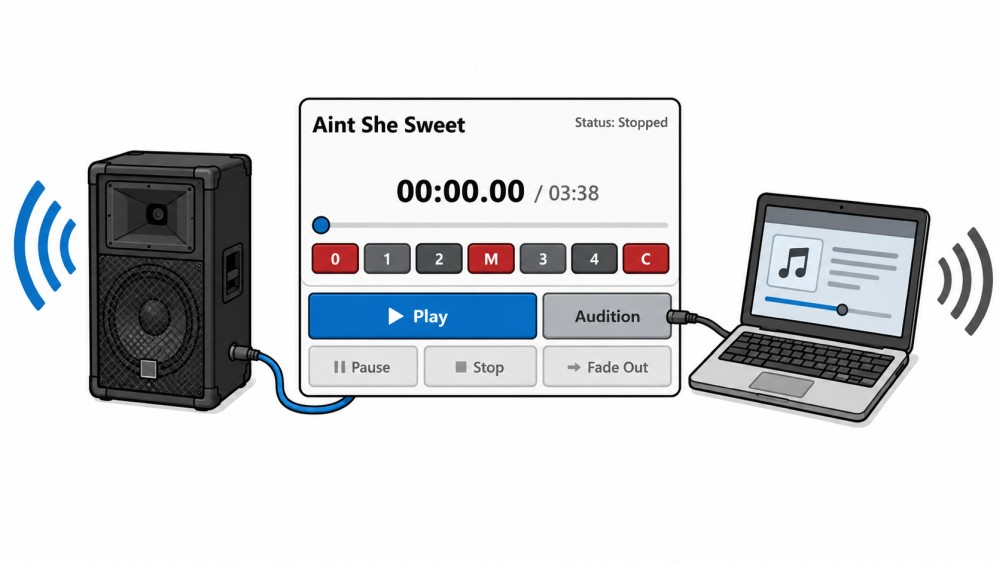
Sometimes you want to listen to a song briefly before it actually plays through the sound system.
Perhaps you're unsure if it's the right version. There might be multiple recordings from different square dance labels. Or you might want to decide with another caller which song is a better fit.
That's exactly what this is for. Audition Button in the caller's caddy.
From output channel to true preview function
A previous article already discussed the fact that Callers Caddy can use different audio outputs.
That was the basis.
Now the function goes one step further:
You can have one primary channel and a secondary channel Set and save.
The primary channel, for example, is the large system in the hall.
The secondary channel can be the built-in laptop speaker or headphones.
Play or Audition
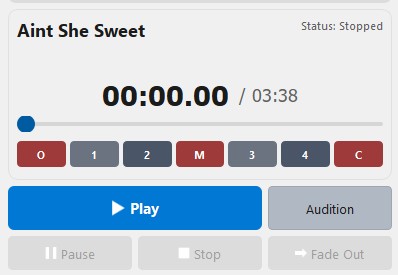
The player now includes, in addition to the normal one, Play Button also one Audition Button.
The difference is simple:
With Play Are you playing the song through the primary channel?.
With Audition You can listen to the song via the secondary channel.
Important:
Play and Audition do not run simultaneously.
So it's not about listening to the next song while a song is playing.
The function is designed to specifically test a song beforehand via a different output.
Practical example: Which version is the correct one?
Imagine you want to play a song together with another caller.
The song exists in several versions from different labels. Perhaps one version sounds more modern. Another has a better intro. A third fits the mood of the evening better.
Previously, you might have had to unplug the audio cable from the system to briefly check the song on your laptop.
Or you would have had to risk the dancers in the hall overhearing.
The Audition Button makes it easier.
You listen to the song briefly through the laptop speakers or headphones. The dancers won't notice. The cable to the sound system remains plugged in. Afterwards, you can calmly decide which version you actually want to play through the sound system.
Set it up once, use it again and again.
You select the primary and secondary channels once and save the setting.
After that, the procedure is clear:
Play for the facility.
Audition for preview.
This saves time and makes dealing with multiple audio outputs much more convenient.
Conclusion
The new Audition Button makes pre-listening easier in the Callers Caddy.
You can test a song via a second output without having to unplug any cables and without the dancers hearing anything.
This is especially useful when there are multiple versions of a song or when preparing together with another caller.