

What are jump links used for?
I don't need this feature myself. I usually just let my music play through.
However, other callers prefer to work with Recordings. It can be helpful to be able to jump directly to specific parts of a song. For example:
- Start of the first module
- Start of the second module
- Start of the third module
- Applause
- End
That's exactly what the Callers Caddy now offers: freely nameable jump markers.
This is how you set a jump link
Let the song play in the player. Once you reach the desired point, click next to the Loop Finder. „Set Marker“.

Next, you will be asked for a label. Here you can enter, for example, "Start of Module 2" or "End". The current timestamp is already entered as a suggestion.
You can create as many jump markers as you like per song.
This is how you jump to a saved location.
You will find your jump links in the following sections. Song Information. Each brand is displayed as its own button. One click is all it takes, and the player jumps directly to the saved position.
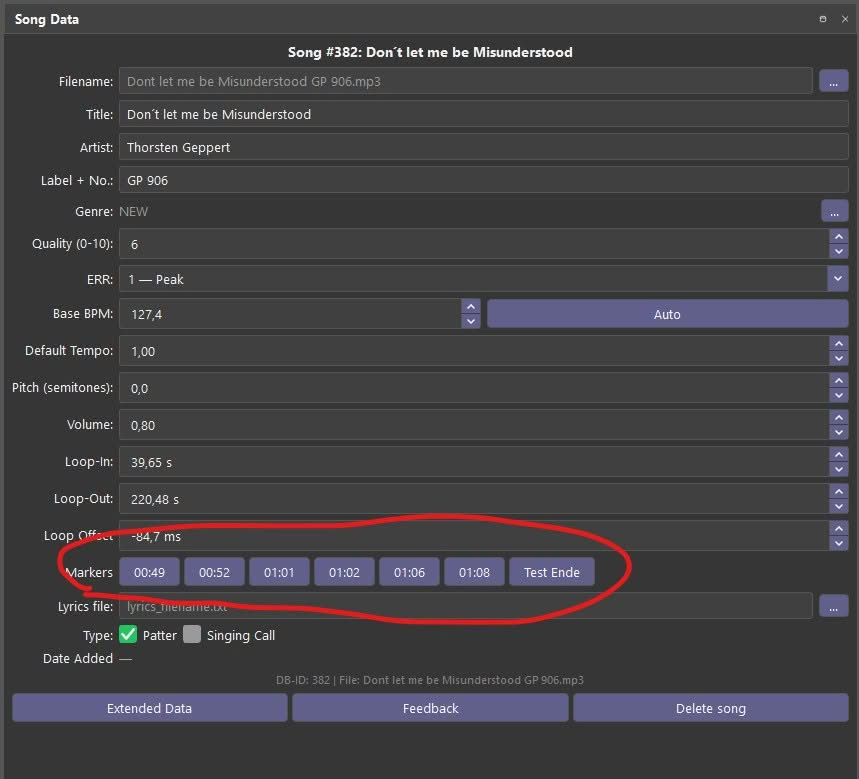
Additionally, there is the new window „Jump Markers“. It displays the most important parts of the current song as large buttons:
Start · Loop Start · Loop End · End
Your own jump markers will appear behind them – automatically sorted according to their position in the song.

Like all windows in Callers Caddy, you can freely drag this window into your personal layout and dock it anywhere. The buttons automatically adjust to the window size.
The little nerd addition
The jump markers are placed in a space-saving manner in the Extended Data The respective song is stored. This prevents unnecessary empty database fields from being created for callers who do not use this function.
The markers always refer to the original time of the song. Therefore, they work regardless of whether you change the tempo or pitch.