

How do you keep track of all the ideas you've planned for a club night?
You want to play a specific song.
You want to repeat a sequence.
You have a hint for the class.
You want to practice Swing Thru at a specific point.
Such ideas are quickly jotted down.
But there is little time to search while calling.
That's exactly what the Callers Caddy now offers. Shortcodes in notes.
Notes become actions
Notes are no longer just memories.
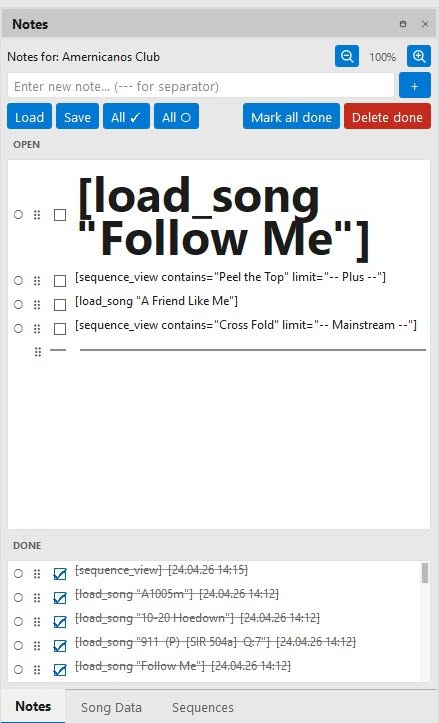
A note can now contain a small command.
This command is called Shortcode.
When you check off the note, Callers Caddy executes the shortcode.
Example:
[load_song "YRR 049 - Electro Blues"]
This shortcode loads a song.
Or:
[sequence_view contains="Swing Thru" limit="MS"]
This shortcode opens the sequence view with appropriate filters.
This is how an idea directly becomes the next step.
The first 2 shortcodes
So far there are two shortcodes.
load_song
[load_song "Title"]
This shortcode loads a song based on its title.
This is helpful if you want to schedule a specific song for a specific point in your evening.
sequence_view
[sequence_view]
This shortcode opens the sequence view.
You can also control it more precisely:
[sequence_view id=42]
opens a specific sequence.
[sequence_view contains="Swing Thru" limit="MS"]
opens the sequence view with a filter.
In this example, sequences with Swing Thru in Mainstream-Level displayed.
The most important difference to Rules
Shortcodes are similar to the rules in Callers Caddy.
Both can trigger actions.
The difference lies in the process.
Rules need their own triggers.
For example, different keys, shortcuts, or events.
If you want to start many actions directly, you need many triggers quickly.
Shortcodes work differently.
They're right there in your notes.
So your plan is in the list.
If you assign the act of checking off the top note to a key, a single key is sufficient for the entire process.
You press the button.
The top note is checked off.
The shortcode is executed.
The next note moves to the top.
This is how you work through your prepared plan step by step.
One button for the next step
This could be a normal shortcut.
Or a button on your StreamDeck.
Some callers also use this MAO, i.e., a wireless remote device with an extra button.
Even older remote cables can be of interest.
Many of them also have a red reset button.
Previously, this was used to move the record arm back to a specific position.
Today, this data line can be used differently.
For example, to check off the top note and move on to the next idea.
This turns an old reset button into a modern "next" button for your workflow.
You don't need to memorize the shortcodes.
The structure of a shortcode is not necessarily easy to remember.
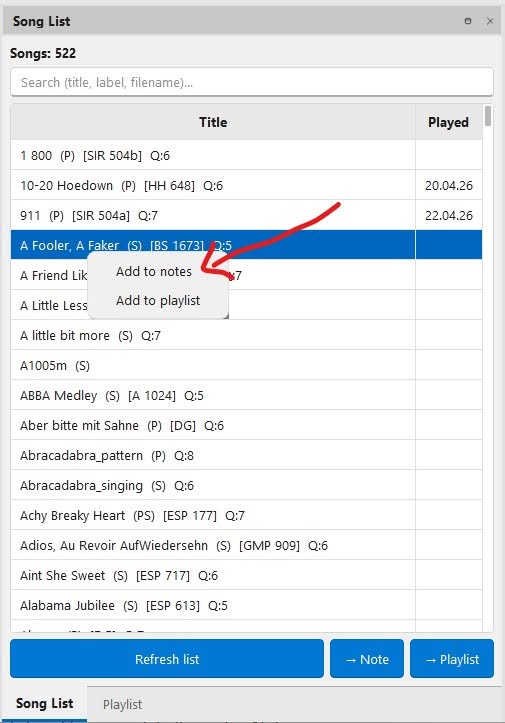
That's why there's a button in several places in the Callers Caddy:
→ Note
This allows you to directly copy suitable shortcodes into your notes.
This is evident from:
Song list
Playlist
Sequence Overview
Sequence Detail
The sequence overview also includes:
→ Filter
This will transfer the current filters as a shortcode into the notes.

You can also right-click Entries from song list, Add playlist and sequence table to the notes.
A flexible plan instead of a rigid script
A club night needs freedom.
You have to react to the dancers.
You adjust the level.
You adjust the energy.
You decide live.
Shortcodes do not take away this freedom from you.
They simply help you to find your prepared ideas more quickly.
Your plan is in the notes.
You go through it step by step.
And if the evening takes a different turn, you simply skip a note or change the schedule.
This turns the notes window into a kind of flowchart.
Not rigid.
Not complicated.
But very practical.
Conclusion
Shortcodes in notes connect planning and action.
You can prepare a song.
You can prepare a sequence.
You You can prepare a filter.
And during the club night, a single checkmark is all it takes to start the next step.
Or even simpler:
One key.
A note.
The next step.
Search less.
Call more.