


The big leaps are here – now come the fine details.
The major new features such as the Loop Finder are in the Callers Caddy already There. Features like these are immediately noticeable. They visibly bring a lot of dynamism to the software.
Now it's about something else. Now it's about the small, subtle details. These are precisely the things that often make a real difference in everyday life. They save clicks. They prevent cognitive errors. And they combine functions that previously existed side by side.
I think that's exactly how you can tell if a software program is slowly growing together.
When individual parts begin to work together
Perhaps you know this feeling. One function is good on its own. Another one is good too. But only when both work together seamlessly does it feel complete.
The Callers Caddy is currently developing in exactly this direction.
A good example of this is the new functionality surrounding dance programs, Locations, temporary tempo and Loop specifications. Individually, these are rather minor enhancements. However, together they create a clearer and more useful system.
Dance programs are more than just a name
In the player, you can now see directly which dance program is currently active. This is practical because you immediately have an overview of the current setting.
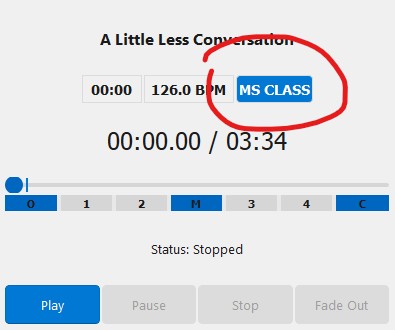
But even more importantly: A dance program is no longer just a label. It also brings its own set of principles. These include, for example, the desired pattern length.
You can find the dance programs and their pattern lengths You in the menu under Database – Manage dance programs Adjust. There you create new programs, rename existing ones, change the order and enter the desired target pattern length.
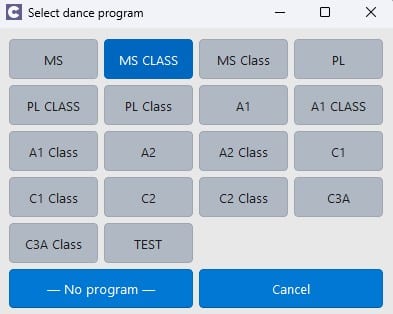
This transforms a simple abbreviation into more than just a label. The dance program gains significance for the sequence of events.
Locations now store more context
The locations have also changed. You can now assign a fixed dance program to a location.

This means that when you select a location, the Callers Caddy automatically sets the appropriate program. So you don't have to remember to do it every time.
This is especially helpful if you're calling from different locations. Perhaps one evening is for mainstream calls, another for class calls, and the next for A1 calls. This link saves you a small step each time. And it's precisely these small steps that add up.
Temporary pace – set it once, benefit from it later.
You can now also add a location temporary tempo save.
You can find this setting in location dialog about the button Settings. There you can define the dance program for the selected location and also set the temporary tempo.
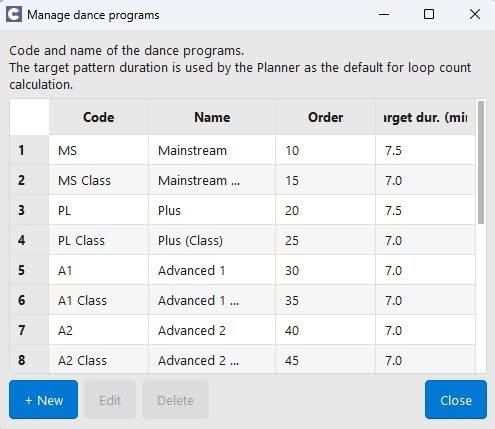
This is very useful if you're working with a class or group that consistently dances at a slower pace. Then you don't have to adjust the tempo every evening. It's equally helpful in the other direction, though. Perhaps you have a young, very energetic dance group that prefers a faster tempo. In that case, you can also set the appropriate value directly for the venue.
You simply select the location, and the saved value is automatically applied.
This leaves your mind freer for what really matters: music, timing, and the dancers in front of you.
Loop settings now adapt better.
I particularly like the connection to loop planning.
When you open the dialog for the number of loops in the Planner or in the playlist, it now automatically receives the target pattern length of the active dance program as a default.

That sounds small, but it's very useful in everyday life.
This means that loop planning is no longer left to chance. It's now based on the program you're currently working in. That's exactly how such functions should work together.
Even small control paths were made more rounded.
There's another detail to consider: You can now also open the Loop dialog directly by double-clicking it. open the Loops column of the playlist.
That saves a small detour. Perhaps nothing earth-shattering. But it's precisely these kinds of things that make the user experience smoother.
You see, it's not always about adding the next huge sensation. Sometimes it's simply about making existing functions work together faster, more clearly, and more logically.
That's exactly how software matures.
I really like these kinds of developments. First come the big building blocks. Then come the small connections between them. And suddenly everything seems more coherent.
That's exactly what's happening right now.
The new details in Caller's caddy is not a loud show function.. But they help you in everyday life. They make processes run more smoothly. And they ensure that several good individual parts gradually become a truly coherent overall system.
Conclusion
The major leaps have been made. Now the finer details are being refined.
And that's a good sign. Because often it's not the spectacular features that make software better in everyday use. It's the small details that save you work and connect things in a meaningful way.
The Callers Caddy is thus growing together step by step. These are the features you'll find in the Callers Caddy today. from version 0.55
And don't worry: The next feature will be significantly more Show character have.