


With version 0.35 The Callers Caddy is getting a new tutorial system. The idea behind it is simple: functions should be explained where they are needed.
Callers Caddy features numerous widgets and windows, each with its own functions. While this is practical in everyday use, it can initially seem overwhelming. A traditional manual offers limited help, as you first have to read the descriptions and then locate them within the interface.
Therefore, version 0.35 relies on guided tutorials directly within the program.
Help directly on the relevant element
The new tutorials guide you step-by-step through each widget. Important elements are highlighted, and a brief explanation appears at the appropriate moment.
This makes it clearer what each area is for and how to use it. This is especially true for users opening Callers Caddy for the first time, but also for anyone who has hardly used certain windows before.
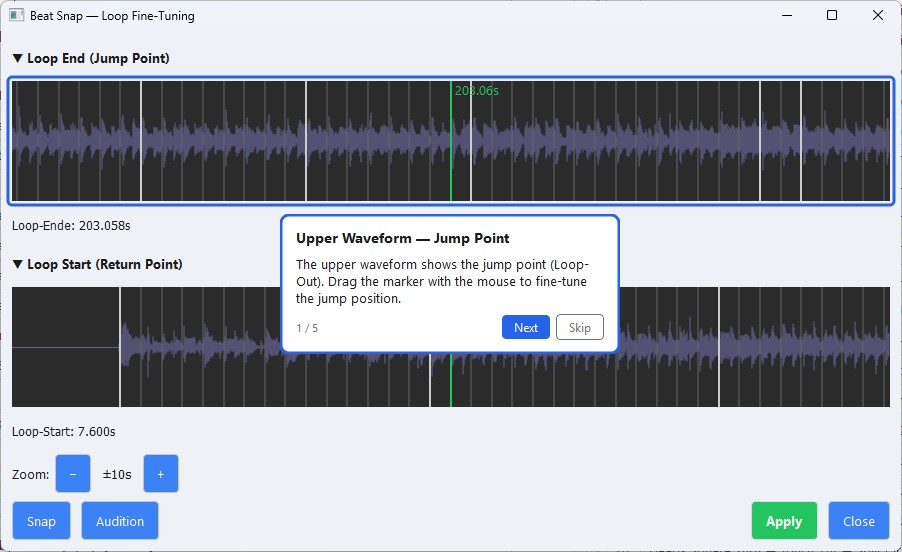
Each important widget has its own tutorial.
The main new feature is that the help is no longer intended as a general introduction, but as a targeted explanation for individual areas.
There are now tutorials for:
- Player
- layout
- Songlist
- Song data
- Planner
- Playlist
- Loop
- Lyrics
- Sequences
- Reports
- potential
This also includes tutorials for the dialogues. Locations and Beat Snap.
The advantage is obvious: those working in the loop widget get help for the loop widget. Anyone wanting to understand the song list starts right there. This is clearer and more practical than a long manual with many chapters.
Don't just build features, but also consider the entry point.
I always strive to make the functions in Callers Caddy as simple and easy to use as possible. However, I also know that even a well-designed interface isn't automatically fully understandable at first glance.
Especially with a program that has many specialized widgets, a well-guided learning path is helpful. You could also say: a meaningful one. Teaching Order. So, instead of simply showing everything at once, explain the important areas in an order that makes it easier to get started.
That's exactly what the new tutorial system is designed for.
Arranged in a logical order
The tutorials are offered in a fixed order. The introduction begins with the basics and then builds upon them step by step.
Those who don't want an introduction right now can postpone it for the current session. And those who want to look something up later can restart the tutorials at any time via the menu.
This allows the system to adapt well to different users: beginners can be guided, while experienced users can access specific areas as needed.
Learn more clearly
For me, this is the real improvement in version 0.35: The Callers Caddy now explains its functions more directly and in a more everyday way.
Instead of having to read documentation first, you can see directly in the program what is meant. This saves time and makes it easier to get started, especially with an interface that has many specialized widgets.
Conclusion
With version 0.35 The caller's caddy becomes more understandable.
The new tutorials provide help precisely where questions arise: directly within the respective widget. This makes getting started easier and the interface clearer to understand.
Those who are new to the Callers Caddy will find their way around more quickly. And those who already use it can gain a better understanding of specific areas.