


Anyone who adds a lot of new songs to their collection knows the problem: Manually setting loop markers takes time. A lot of time.
This is precisely where the new Loop Finder It's attached to the caller's caddy. It's not meant to replace your ear. But it's meant to take some of the preliminary work off your hands, so that you, as the caller, have to search much less yourself.
In the article about Beat-Snap Previously, the focus was on how to cleanly align existing loop markers with the beat. The new Loop Finder starts even earlier: it helps you find suitable points in the song in the first place.
The standard is deliberately designed for a very typical case in a singing call:
the jump from the end of the 3rd sequence to the beginning of the 1st sequence.
Why exactly there?
Because there is almost always a very stable pattern between these two points. These are usually... 256 beats spacing. This allows the search area to be significantly narrowed. The Loop Finder therefore doesn't have to guess across the entire song, but can search much more specifically for relevant candidates.
This saves time and effort. And it increases the chance that the suggestions are directly usable.
Another advantage: A possible Key Change in the Ending This isn't a problem yet. This also makes this approach for singing calls very robust.
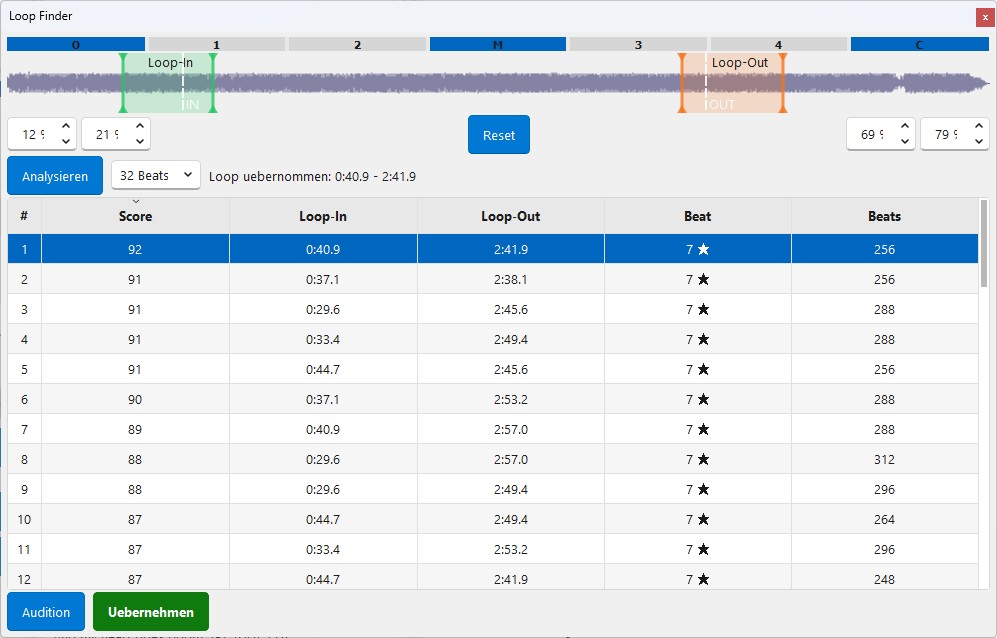
Here's how to use the Loop Finder
The operation is deliberately kept simple:
1. Define the two search windows.
Specify the area in which the Loop Finder should search. Loop-In and Loop-Out You should search. By default, the areas are already preset so that you will very often find good brands on Singing Calls.
2. Select the size of the comparison field.
You can specify the size of the sections being compared: 4, 8, 16, 32 or 64 beats.
For orientation: 64 beats correspond exactly to one singing-call sequence..
3. Start the analysis
Now the Loop Finder checks within the two search areas which sections are particularly suitable for each other.
4. Listen and decide.
With a Double-click You can listen to each suggested jump directly. Then you decide which suggestion works best for your song.
What do the values in the table mean?
To help you better evaluate the suggestions, the Loop Finder displays several values:
ScoreThis field shows how similar the found sections are. 100 would mean: completely identical.
Loop-In: The time position for the beginning of the loop.
Loop-Out: The time position for the end of the loop.
BeatHere you can see which of the 8 Beats the respective section begins.
BeatsThis is the number of beats in the complete loop. For singing calls that you want to use as a pattern, ideally... 256 to see — so 64 × 4.
Less searching, more useful suggestions
For you as a caller, this means above all:
Less manual trial and error, less shifting on suspicion, and a faster, usable starting point for your loop.
Of course, fine-tuning remains possible and sometimes even necessary.
But the better the system prepares the groundwork, the less time you have to invest in each individual pattern.
And that's exactly what the Loop Finder is for.
What about patterns and alternative music pieces?
The Loop Finder is not only interesting for classic singing calls.
Of course, he'll also help you with... Pattern and other alternative music pieces.
The only difference is:
Here you should generally be able to larger comparison windows work.
While the structure of singing calls is often very clear and predictable, patterns and other musical pieces can be structured more freely. Larger windows help the Loop Finder to not only compare very short moments, but also to grasp a broader musical context.
This often makes the proposals more robust.
The basic idea remains the same:
The Loop Finder takes the time-consuming preparation work off your hands, shows you suitable candidates, and then you can hear for yourself which jump really feels good.
If you like, you can skip this section directly. before the conclusion It should be set because thematically it seems like a typical follow-up question.