
That was a huge advantage when we switched to digital music files and could set endless pattern loops. No more manual, clunky music resets with the remote button.
However, setting the loop jump points can sometimes be tricky and time-consuming.
With the new Callers Caddy, it's now 1000 times easier.
1. First you set very roughly Set your jump markers in the song with Loop-In and Loop-Out.
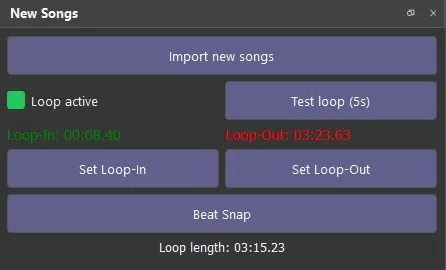
2. After that, the button will appear. Beat Snap unlocked. Beat Snap uses a [unclear] for BPM detection. Comb Filter Bank Estimation. That's done with a Onset Strength Envelope and with comb filters worked to dominant periodicity to determine (=speed).
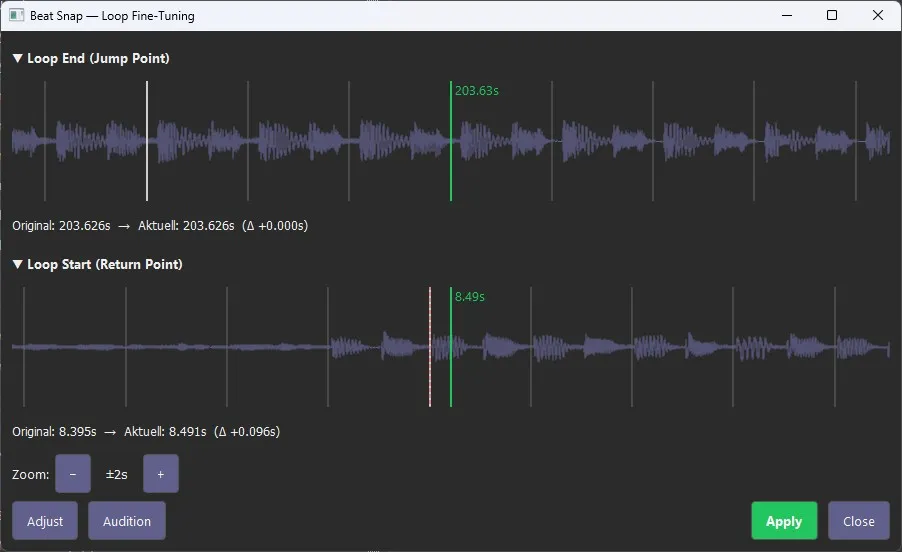
Based on this, the beat positions are derived and a Beat Grid is created and graphically represented with bar lines.
It all sounds very complicated, so I'm making it easier for you. 😉
You move it with the mouse. Simply place the upper and/or lower waveforms in the appropriate positions. You may need to zoom in beforehand.
Adjust automatically shifts the waves so that the jump markers fall exactly on the nearest bar lines.
Audition lets you listen to the current jump.
Are you satisfied with the loop then? Then you accept the changes. Or you discard them.
From now on, setting perfect loops will be easy with minimal effort. Without loss of control.
Beat-Snap is available from Version 0.31.